Spotlight on Information Technology: Behind The Scenes with the Help Desk
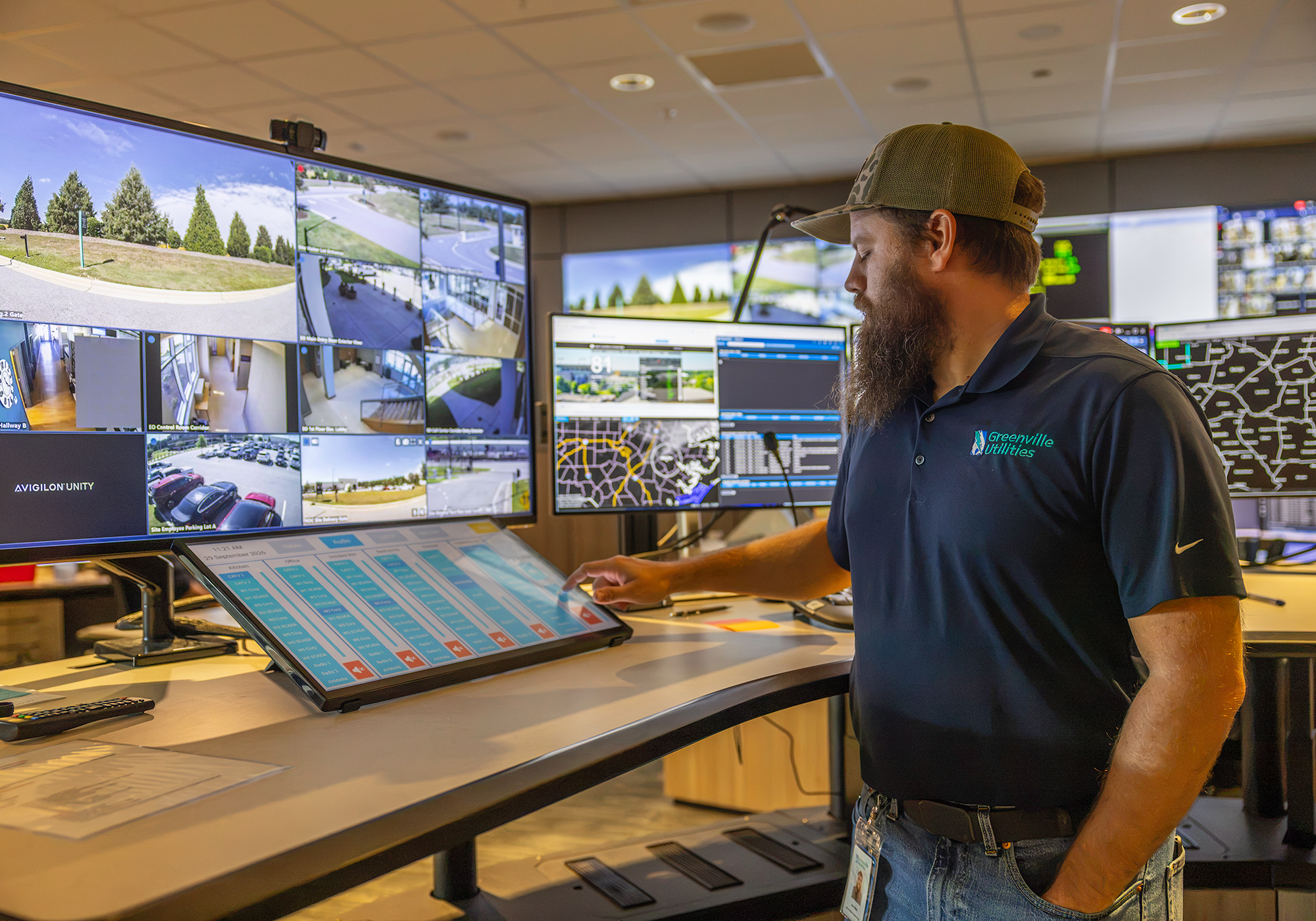
IT Support Specialist II Joe Metz checks the new point-to-point hardware installation in the Control Room.
When a computer crashes, software is down, or audio/visual equipment is on the fritz, one of the six people manning the GUC IT Help Desk is on deck to resolve the problem. In a year’s time, the Help Desk receives more than 8,000 tickets asking for assistance.
It is easy to connect the Help Desk to the internal functions and workflow of each GUC employee. They are also the moving pieces behind the scenes, ensuring that employees are able to communicate with customers to fulfill service-area needs, monitor electric, gas, and water service functions; and respond in timely and in an efficient manner during a crisis.
IT Infrastructure Manager Allen Watkins said the Help Desk is here to provide “white glove” services within GUC. “We provide top-tier services to all individuals that we support, from assistance with CCS, Cityworks, and telephone services, to upgrades and new technology setup,” Allen said.
Most recently, the Help Desk played an integral role in ensuring that staff was equipped with all their technology needs as the Main Office renovations began. This included setting up the Arlington satellite office for Administration, Finance, Legal and IT, along with other employees in different locations during the renovations.
The Main Office renovations also include several IT projects, such as technology installations for the Board Room and the General Manager’s Office conference room.
Help Desk support will also be critical in the audiovisual technical installation in the new training space when the Operations Center begins its renovations.
“We might be at four of five different locations in a week, and sometimes it can all be in the same day. Our bosses are all the employees here,” said IT Support Specialist Supervisor Nick Klapp. “I want everyone to have a great experience.”
The Help Desk is familiar with making large-scale technology moves. In the case of Hurricane Matthew, they moved and set up all of GUC’s technology assets located on Mumford Road to a new space within 24 hours. In 2020, when the new Operations Center was built, they did the same, but a normal project timeline.
Though the Help Desk works to resolve issues quickly – typically responding to a submitted ticket within 30 minutes – they also provide solutions for anticipated long-term issues.

Solutions Oriented
IT Support Specialist II Joe Metz stands behind the wall of screens in the Control Room pointing to a large control device that is now operated in-house, which is a new development for the Control Room equipment.
The Help Desk saw, in advance of any problems occurring, that any failure of equipment in the Control Room would be a significant issue. The Control Room is a 24/7 operation for electric, gas, sewer, and water, monitoring a system consisting
of thousands of miles of electric lines; hundreds of miles of gas mains, gas service pipelines, water lines, and sewer lines; and 25 substations. It also operates the SCADA (Supervisory Control and Data Acquisition) and the Outage Management Systems, load management activities, and handling after-hours customer service calls.
At the time of its construction, the contractors custom built the Control Room to meet GUC’s needs. However, as time went on, the Help Desk recognized the screens that line the wall of the Control Room would be reaching the end of useful life.
“If one of the screens went out, we didn’t have a fallback plan,” Joe said. “Everything was a custom job, and that was going to be a problem. Audiovisual equipment isn’t typically created to run 24/7 like the Control Room operates. If one goes out, we’d have to work with a contractor to replace it, and they were not doing this custom work anymore. We had to figure out how to fix this issue and create a more flexible form of repair and hardware replacement.”
A major project was opened for the Control Room with IT leading the way to revamp the wallboard system controls. IT worked with a vendor to design, install, test and deliver the system without impacting the ability of the Control Room employees to do their daily job. With the new system, GUC has local support and control if something needs replacing.

“We moved away from software functions and moved to point-to-point hardware instead,” Joe said while opening a cabinet below control desk showcasing rows and rows of switches. “We did it to save money and to make sure things continue to work, keeping our services reliable and safe, and people happy.”
IT Support Specialist II Isaiah Bradshaw enjoys the nature of problem solving at the Help Desk.
“I like to improve what we already have,” he said. “I would say there isn’t anything that we can’t fix, but it does all depend on how long we have to figure it out.”
Employee Support
The Help Desk begins supporting employees with technology needs immediately, walking new hires through how to set up their different applications and devices on their second day of work (during the IT Orientation session).
The new employee orientation sets the tone for how employees should approach using technology at GUC and keeping the technology system safe.
During the IT Orientation session, IT Support Specialists review GUC’s Multi Factor Authenticator (MFA) protocols, the EBS portal, CBT training, KnowBe4 Cybersecurity Training platform, Fraud Awareness Training, the Acceptable Use Policy, and iOS Device usage.
“The new employee orientation is a big thing that we do at the Help Desk,” Nick said. “They can get their training, and they can take what they learn during orientation to the field or to the office.”
The Help Desk handles a wide range of requests, supporting 565 devices, including docks, switches, routers, and printers; 278 active desktops; 355 laptops; 142 docking stations; 167 iPhones; and 376 iPads; along with software systems such as Customer Cloud Service (CCS), Cityworks, EBS, and Taleo.
“I get to talk to a lot of folks, and there is something different going on each day. I like that,” Isaiah said.